
FT7 Game – FT7 APK, FT7 Online, FT7 Download & FT7 App

Welcome to the complete guide to FT7 Game, covering the most searched terms including FT7 APK, FT7 Online, FT7 Download, and FT7 App. This page provides useful information about the FT7 platform, mobile access, application installation, account features, and general safety considerations.
| Title | Details |
|---|---|
| App Name: | FT7 GAME APK |
| App Size: | 19.77Mb |
| App Version: | 1.0.3 |
| App Bonus: | ₹500 |
| App Updated: | This Month |


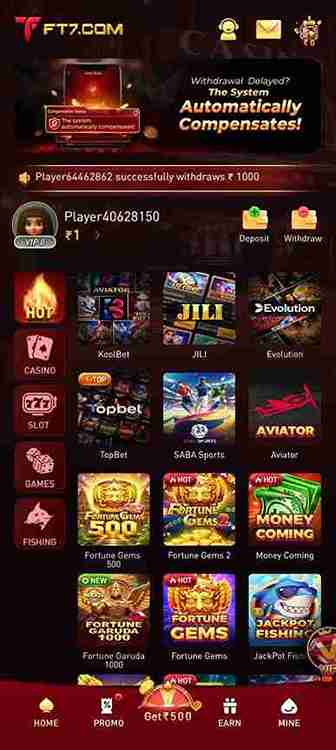
What Is FT7 Game?
FT7 Game is an online gaming platform that provides access to a selection of digital games and entertainment features. The platform is designed with a straightforward interface so users can navigate between available sections without unnecessary complexity.
Users interested in FT7 can explore the available platform features through the website or supported application. Before downloading or installing any application, users should verify that they are using an official and trusted source.
FT7 Game Features
FT7 Game may provide a range of features designed to make online gaming more convenient.
Simple User Interface
The FT7 interface is designed to help users find different sections and features easily.
Mobile-Friendly Experience
Users can access supported FT7 services through compatible mobile devices, depending on the availability of the platform in their region.
Multiple Gaming Options
The platform may offer different types of online games and entertainment options, allowing users to explore available categories from one location.
Account Access
Registered users can use their account credentials to access supported features and manage their account.
Why Choose FT7 Game?
FT7 Game is designed to offer a simple and convenient online gaming experience for users. With an easy-to-use interface and mobile-friendly access, the platform can make it easier to explore available games and features.
Easy Navigation: Find different sections and available games through a straightforward interface.
Mobile-Friendly: Access supported FT7 Game services on compatible smartphones and tablets.
FT7 App Access: The FT7 App can provide a convenient way to use supported platform features on mobile devices.
Simple Account Management: Manage your account and access available features from one place.
Multiple Gaming Options: Explore different categories and gaming options available on the platform.
Convenient Online Access: FT7 Online services can be accessed through a compatible device and internet connection.
Regular Updates: Official updates may introduce improvements, new features, and performance enhancements.
Account Security: Users can protect their accounts by using strong passwords and downloading applications only from trusted sources.
User-Friendly Experience: The platform focuses on making navigation and access simple for users
How to Download FT7 APK (Step-by-Step)
Downloading the FT7 APK on an Android device can be straightforward when you use a trusted and verified source. Before installing any APK, make sure the file is legitimate and compatible with your device.
Step 1: Visit a Trusted FT7 Source
Open your browser and visit the official or verified FT7 website where the APK is provided. Avoid unfamiliar websites offering modified or suspicious APK files.
Step 2: Find the FT7 APK Download Option
Look for the FT7 APK or FT7 Download section on the website. Check the application name and version before starting the download.
Step 3: Download the APK File
Tap the download button and wait for the FT7 APK file to finish downloading. Make sure your device has enough storage space.
Step 4: Check the Downloaded File
Before installation, verify the APK source, file name, and version. Do not install files that appear modified, suspicious, or come from an unknown source.
Step 5: Allow Installation if Required
Android may require permission to install an application obtained outside the Google Play Store. Only enable installation from the source you trust, and disable the permission again after installation if it is no longer needed.
Step 6: Install FT7 APK
Open the downloaded APK file and follow the on-screen installation instructions. Wait until the installation process is complete.
Step 7: Open the FT7 App
After installation, locate the FT7 App on your device and open it. If an account is required, follow the platform’s registration or login instructions.
Step 8: Keep FT7 Updated
Use official or verified sources for future FT7 App updates. Keeping the application updated can help provide access to the latest available features and security improvements.
FT7 APK Safety Tips
Download the APK only from a trusted source.
Check the application version before installation.
Avoid modified or unofficial APK files.
Review application permissions carefully.
Keep your Android device updated.
Never share passwords or OTPs with anyone.
FT7 APK
The FT7 APK is an Android application package that may be used to install the FT7 application on compatible Android devices.
An APK should only be installed when it comes from a trustworthy and verified source. Before installation, users should check the application details, permissions, version information, and source.
How to Install FT7 APK
Visit the verified FT7 source.
Locate the available FT7 APK file.
Download the latest compatible version.
Review the file and application information.
Install the APK on a compatible Android device.
Open the FT7 App after installation.
Sign in or create an account if required.
Users should avoid downloading APK files from unknown third-party websites because unofficial files may contain unwanted software or modified content.
FT7 App
The FT7 App provides a mobile-focused way to access supported FT7 services. Depending on device and regional availability, users may be able to use the application to browse games, manage their account, and access available platform features.
A properly maintained application can also provide a more convenient experience than using a mobile browser, where supported.
How to Create an FT7 Account
If registration is available, users can generally create an FT7 account by following the registration instructions provided by the platform.
A typical registration process may require basic information and account credentials. Always provide accurate information and review the platform’s terms before completing registration.
FT7 Game Categories
Depending on the current platform offering, FT7 may organize its available games into different categories. Categories can make it easier for users to discover the type of entertainment they are interested in.
The available games and categories can change over time, so users should check the current FT7 platform for the latest information.
FT7 Game Privacy
Before creating an account or using any online service, users should review the platform’s privacy policy. The privacy policy can explain what information may be collected, how information is used, and how users can manage their data.
Users should only provide information that is required by the legitimate platform and should avoid sharing sensitive personal details through unofficial channels.
Why Users Look for FT7 Game
People searching for FT7 Game, FT7 APK, FT7 Download, and FT7 App may be looking for a convenient way to access the platform from different devices.
A simple interface, mobile accessibility, account features, and organized gaming sections can make an online gaming platform easier to navigate.
Conclusion
FT7 Game provides a convenient topic for users searching for online gaming access, while FT7 APK, FT7 Download, and FT7 App are useful search terms for users interested in accessing the platform through compatible mobile devices.
Before downloading or using any gaming application, always verify the source, review the applicable terms, protect your account information, and follow local laws and platform requirements.